LESSON 2: COMPUTER HARDWARE AND SOFTWARE – UNDERSTANDING THE MAIN COMPONENTS OF A COMPUTER
Introduction Before learning how to use a computer effectively, it is important to understand the two major parts that make every computer work: Hardware and Software.

LESSON 2: COMPUTER HARDWARE AND SOFTWARE – UNDERSTANDING THE MAIN COMPONENTS OF A COMPUTER
Introduction
Before learning how to use a computer effectively, it is important to understand the two major parts that make every computer work: Hardware and Software.
Many beginners use computers every day but do not understand the difference between hardware and software. However, understanding these two concepts is the foundation of computer knowledge.
Just as a human body needs both physical organs and intelligence to function properly, a computer also needs hardware and software to perform tasks.
In this lesson, you will learn what hardware and software are, their types, functions, and why both are essential for a computer system.
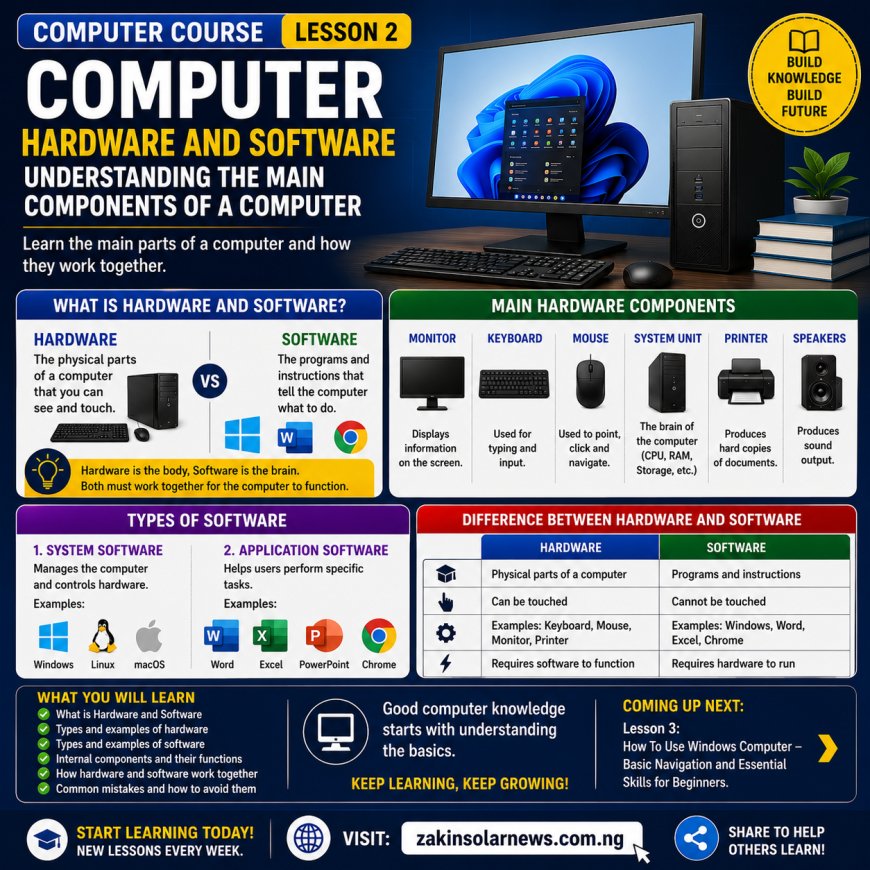
What Is Computer Hardware?
Hardware refers to all the physical parts of a computer that can be seen and touched.
In simple terms:
Hardware = The physical components of a computer.
Examples include:
✅ Monitor
✅ Keyboard
✅ Mouse
✅ System Unit
✅ Printer
✅ Speakers
✅ Hard Drive
✅ Webcam
Without hardware, a computer cannot physically operate.
Main Hardware Components
1. Monitor
The monitor is the screen that displays information.
Functions:
✔ Displays text, images, and videos.
✔ Allows users to see their work.
2. Keyboard
The keyboard is used for typing.
Functions:
✔ Entering text.
✔ Giving commands to the computer.
3. Mouse
The mouse is a pointing device.
Functions:
✔ Selecting items.
✔ Opening programs.
✔ Navigating the computer.
4. System Unit
The system unit is often called the "brain box" of the computer.
It contains important components such as:
Processor (CPU)
RAM
Storage Drive
Motherboard
5. Printer
A printer produces hard copies of documents and images.
6. Speakers
Speakers produce sound output from the computer.
What Is Software?
Software refers to the programs and instructions that tell the computer what to do.
Unlike hardware, software cannot be touched physically.
In simple terms:
Software = The intelligence that controls the hardware.
Without software, hardware would be useless.
Types of Software
There are two major types of software:
1. System Software
System software manages the computer and allows it to operate.
Examples:
✅ Windows
✅ Linux
✅ macOS
Functions:
✔ Controls hardware.
✔ Runs the computer system.
✔ Provides a platform for applications.
2. Application Software
Application software helps users perform specific tasks.
Examples:
✅ Microsoft Word
✅ Microsoft Excel
✅ PowerPoint
✅ Google Chrome
✅ VLC Media Player
Functions:
✔ Writing documents.
✔ Browsing the internet.
✔ Watching videos.
✔ Creating presentations.
Difference Between Hardware and Software
Hardware
Software
Physical parts of a computer
Programs and instructions
Can be touched
Cannot be touched
Examples: Keyboard, Mouse
Examples: Windows, Word
Requires software to function
Requires hardware to run
Important Internal Hardware Components
1. CPU (Central Processing Unit)
The CPU is known as the brain of the computer.
Functions:
✔ Processes data.
✔ Executes instructions.
✔ Controls operations.
2. RAM (Random Access Memory)
RAM is temporary memory used while working.
Functions:
✔ Speeds up computer performance.
✔ Stores active programs temporarily.
3. Hard Drive / SSD
Used for permanent storage.
Functions:
✔ Stores files.
✔ Stores software.
✔ Stores operating systems.
4. Motherboard
The motherboard connects all computer components together.
Why Hardware and Software Must Work Together
A computer cannot function properly without both hardware and software.
Example:
Microsoft Word (Software) cannot work without a monitor, keyboard, CPU, and storage devices (Hardware).
Similarly:
A keyboard (Hardware) cannot perform useful tasks without software controlling it.
This shows that both depend on each other.
Common Computer Devices and Their Categories
Device
Category
Keyboard
Hardware
Mouse
Hardware
Monitor
Hardware
Printer
Hardware
Windows
Software
Microsoft Word
Software
Google Chrome
Software
PowerPoint
Software
Importance of Learning Hardware and Software
Understanding hardware and software helps you:
✔ Troubleshoot basic computer problems.
✔ Understand computer specifications.
✔ Choose the right computer.
✔ Install software correctly.
✔ Improve your computer knowledge.
Common Mistakes Beginners Make
1. Confusing Hardware with Software
2. Installing Unknown Software
3. Ignoring Computer Maintenance
4. Downloading Unsafe Programs
5. Not Understanding System Requirements
Conclusion
Hardware and software are the two most important components of every computer system. Hardware represents the physical parts, while software provides instructions that allow the hardware to function.
A good understanding of both concepts is essential for anyone who wants to become computer literate.
Remember:
"Hardware Is The Body, Software Is The Brain."
Meaning: Hardware provides the structure, while software provides the intelligence that makes a computer useful.
Quiz Questions
What is computer hardware?
What is computer software?
Mention five examples of hardware.
Mention five examples of software.
What is the function of the CPU?
What is the difference between hardware and software?
Why are both hardware and software important?
Next Lesson:
Lesson 3: How To Use Windows Computer – Basic Navigation and Essential Skills for Beginners.
What's Your Reaction?
 Like
0
Like
0
 Dislike
0
Dislike
0
 Love
0
Love
0
 Funny
0
Funny
0
 Angry
0
Angry
0
 Sad
0
Sad
0
 Wow
0
Wow
0