LESSON 5: MICROSOFT EXCEL – UNDERSTANDING SPREADSHEETS, FORMULAS, AND DATA MANAGEMENT
Introduction Microsoft Excel is one of the most powerful and widely used applications in the world. It is used by businesses, schools, banks, hospitals, government offices, and professionals to organize, calculate, analyze, and manage data.

LESSON 5: MICROSOFT EXCEL – UNDERSTANDING SPREADSHEETS, FORMULAS, AND DATA MANAGEMENT
Introduction
Microsoft Excel is one of the most powerful and widely used applications in the world. It is used by businesses, schools, banks, hospitals, government offices, and professionals to organize, calculate, analyze, and manage data.
Many companies consider Excel skills as one of the most important requirements for office jobs because it helps users work faster and make better decisions using data.
Whether you want to calculate expenses, manage sales records, track inventory, prepare reports, or analyze business performance, Microsoft Excel provides the tools needed to do the job efficiently.
In this lesson, you will learn the basics of Excel, understand spreadsheets, enter data, use formulas, and perform basic calculations.
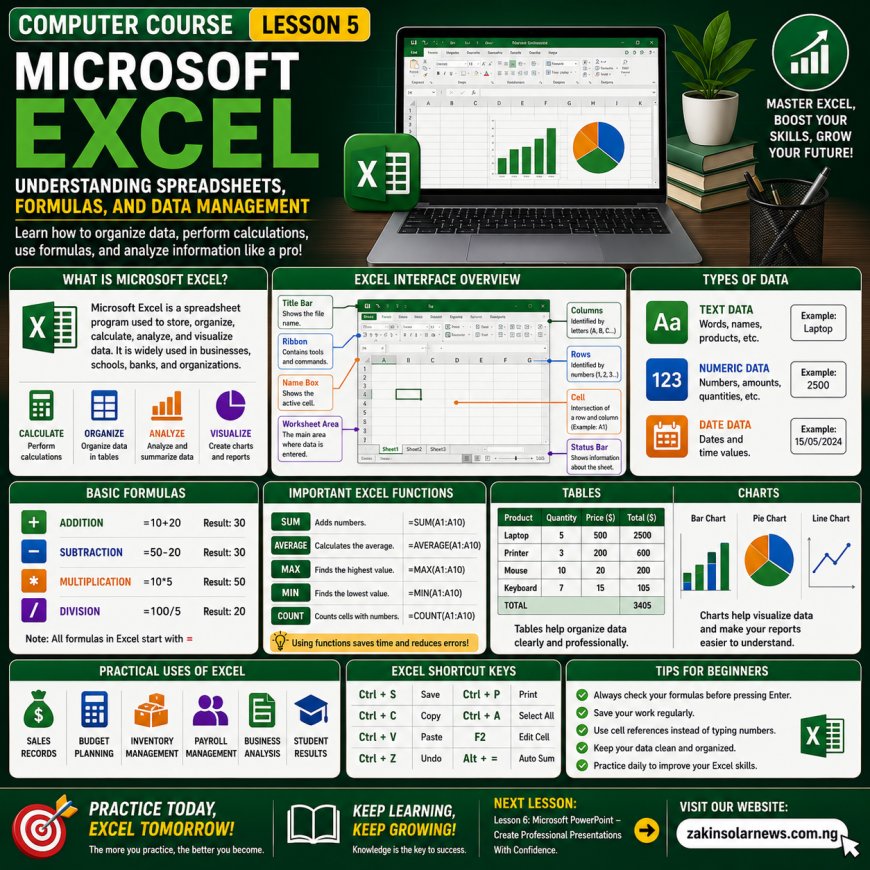
What Is Microsoft Excel?
Microsoft Excel is a spreadsheet application developed by Microsoft.
It is used to:
✔ Store data
✔ Organize information
✔ Perform calculations
✔ Create charts
✔ Analyze data
✔ Generate reports
Excel helps users handle large amounts of information accurately and quickly.
Understanding The Excel Interface
When Excel opens, you will see several important parts.
1. Workbook
A workbook is an Excel file.
Example:
Sales Report.xlsx
Budget.xlsx
2. Worksheet
A worksheet is a page inside a workbook.
A workbook can contain multiple worksheets.
3. Rows
Rows run horizontally.
They are identified by numbers:
1, 2, 3, 4, 5...
4. Columns
Columns run vertically.
They are identified by letters:
A, B, C, D, E...
5. Cells
A cell is the intersection of a row and a column.
Examples:
A1
B5
C10
Cells are where data is entered.
Entering Data In Excel
To enter data:
Click a cell.
Type your information.
Press Enter.
Examples of data:
Names
Numbers
Dates
Prices
Products
Types Of Data In Excel
1. Text Data
Examples:
John
Computer
Office
2. Numeric Data
Examples:
100
5000
25000
3. Date Data
Examples:
01/01/2026
15/06/2026
Basic Excel Formulas
Formulas help Excel perform calculations automatically.
Every formula starts with:
=
Addition Formula
Example:
=10+20
Result:
30
Subtraction Formula
Example:
=50-20
Result:
30
Multiplication Formula
Example:
=10*5
Result:
50
Division Formula
Example:
=100/5
Result:
20
Using Cell References
Instead of typing numbers directly, Excel can use cell references.
Example:
A1 = 100
A2 = 200
Formula:
=A1+A2
Result:
300
This method is more efficient and professional.
Important Excel Functions
1. SUM Function
Used to add numbers automatically.
Example:
=SUM(A1:A10)
Adds all values from A1 to A10.
2. AVERAGE Function
Calculates the average.
Example:
=AVERAGE(A1:A10)
3. MAX Function
Finds the highest value.
Example:
=MAX(A1:A10)
4. MIN Function
Finds the lowest value.
Example:
=MIN(A1:A10)
5. COUNT Function
Counts cells containing numbers.
Example:
=COUNT(A1:A10)
Formatting Data
Formatting improves the appearance of spreadsheets.
You can:
✔ Change font size
✔ Change font color
✔ Make text bold
✔ Adjust column width
✔ Apply borders
✔ Highlight important information
Creating Tables
Tables make data easier to read and analyze.
Example:
Product
Quantity
Price
Laptop
5
$500
Printer
3
$200
Mouse
10
$20
Tables improve organization.
Creating Charts
Charts help visualize data.
Types of charts:
Bar Chart
Compares values.
Pie Chart
Shows percentages.
Line Chart
Shows trends over time.
Charts make reports easier to understand.
Practical Uses Of Microsoft Excel
Excel is commonly used for:
✅ Sales Records
✅ Business Reports
✅ Budget Planning
✅ Expense Tracking
✅ Student Results
✅ Inventory Management
✅ Financial Analysis
✅ Payroll Records
Common Mistakes Beginners Make
1. Incorrect Formulas
2. Typing Wrong Data
3. Forgetting To Save Work
4. Using Wrong Cell References
5. Poor Spreadsheet Organization
Importance Of Learning Excel
Learning Excel can help you:
✔ Improve office skills
✔ Increase job opportunities
✔ Manage business records
✔ Analyze data effectively
✔ Improve productivity
✔ Make better business decisions
Many employers consider Excel one of the most valuable computer skills.
Excel Keyboard Shortcuts
Shortcut
Function
Ctrl + S
Save
Ctrl + C
Copy
Ctrl + V
Paste
Ctrl + Z
Undo
Ctrl + P
Ctrl + A
Select All
F2
Edit Cell
Alt + =
Auto Sum
Conclusion
Microsoft Excel is a powerful tool for organizing, calculating, and analyzing information. Whether you are a student, employee, entrepreneur, or business owner, Excel can help you work more efficiently and professionally.
The more you practice Excel, the more valuable your computer skills become.
Remember:
"Data Is Valuable, But Excel Helps You Understand It."
Meaning: Information becomes more useful when it is properly organized and analyzed.
Quiz Questions
What is Microsoft Excel?
What is a workbook?
What is a worksheet?
What is a cell?
What is the purpose of the SUM function?
Mention five practical uses of Excel.
Why is Excel important in business and office work?
Next Lesson:
Lesson 6: Microsoft PowerPoint – Creating Professional Presentations For School, Business, and Public Speaking.
What's Your Reaction?
 Like
0
Like
0
 Dislike
0
Dislike
0
 Love
0
Love
0
 Funny
0
Funny
0
 Angry
0
Angry
0
 Sad
0
Sad
0
 Wow
0
Wow
0